

Face Swap
Face Swap screenshots (12)










Description Face Swap
A Practical Review of Face Swap: Beyond the Gimmick
The concept of face swapping is often dismissed as a simple party trick, but in practice, its execution presents a complex computational challenge. The Face Swap application by Axhunter approaches this task with a streamlined, single-purpose interface designed for immediate user engagement. This review examines the application's operational workflow, from image acquisition to final export, focusing on the mechanics of its automated detection system and the scope of its post-swap editing suite. The objective is to assess its functionality as a dedicated tool within the photography category, rather than a feature buried in a more complex editor.
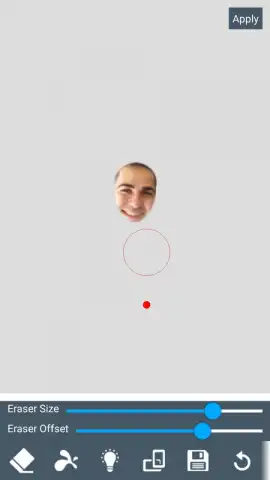
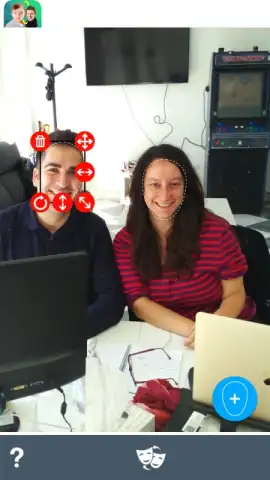
The application initiates with a standard dual-source import: users can either access their device's local gallery or utilize the integrated camera to capture a new image directly. The core functionality is contingent on the software detecting a minimum of two human faces within the frame, which it accomplishes through an automated recognition algorithm. While the default detection and selection are generally accurate for well-lit, forward-facing subjects, the application provides manual adjustment tools. These allow users to refine the selection contours, which is critical for achieving a natural blend when facial angles or hairstyles complicate the initial auto-detection. Following the selection phase, the swap is executed automatically, though parameters for alignment and blending can be manually fine-tuned.
Beyond the primary swap, the application offers a secondary layer of image manipulation. This includes the ability to replace the photograph's background entirely, effectively separating the swapped subjects from their original context. Prior to final export, the edited composition can be further altered through a library of standard color filters, lighting effects, and a collection of graphical stickers. It is important to note that the technical success of the core face swap varies significantly with input quality; results range from seamless to visibly artificial, largely dependent on original lighting, resolution, and facial orientation. The process, however, remains consistent and repeatable.
Core Functionality and Editing Tools
- Execute automated face detection and swapping between two subjects in a single image.
- Manually adjust selection masks for precise control over the swap boundaries and area.
- Replace or modify the background of the original photograph after the face swap is complete.
- Apply a range of post-production color filters, lighting effects, and transparency adjustments.
- Augment the final image with a library of decorative and humorous sticker overlays.
Download the Face Swap mobile app now to access exclusive early-user features—this limited toolkit offer is subject to change.
Disclaimer: This application requires a persistent internet connection for full functionality and access to certain features. It may contain optional in-app purchases for premium effects, filters, or to remove advertisements. Users should be aware of the application's data collection and usage practices as detailed in its privacy policy. Age restrictions may apply due to user-generated content. Network fees for data usage may be incurred.


