

Kotatsu
Kotatsu screenshots (4)


Description Kotatsu
A Library in Your Pocket
For years, accessing a comprehensive, organized manga library on a mobile device was a fragmented experience, requiring multiple apps and websites. The Kotatsu app approaches this challenge not by hosting content, but by becoming a sophisticated aggregator and reader, effectively transforming your Android device into a unified, personal manga terminal. It operates on a simple yet powerful principle: centralizing access to over a hundred independent online catalogs, providing a single, streamlined interface for discovery, reading, and offline archiving. This review examines the mechanics of how Kotatsu delivers a near-boundless reading experience without the typical clutter of ads or subscription walls.
Core Functionality and User Experience
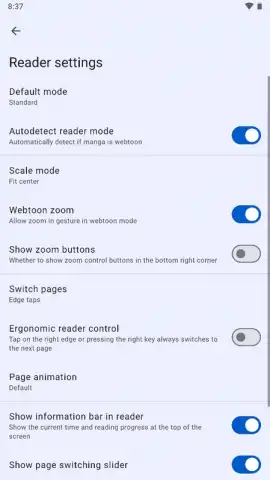
The application’s architecture is its defining feature. Kotatsu itself contains no manga files on its servers. Instead, it functions as a meta-search engine and high-fidelity reader that pulls content from a vast network of external sources. When you enter a title into the unified search bar, the app queries its configured catalogs simultaneously, presenting a consolidated list of results. This eliminates the need to visit individual sites, though it requires an internet connection for initial sourcing and updates. The reading engine is highly configurable, offering multiple viewing modes (left-to-right, right-to-left, vertical scroll), granular color correction filters for page contrast and eye comfort, and customizable controls for page turns via taps, swipes, or volume keys. A sophisticated tag-based discovery system allows for filtering by genre, theme, and demographic, while a random title generator—activated by a dice icon—serves as an effective tool for serendipitous discovery when your reading list is exhausted.
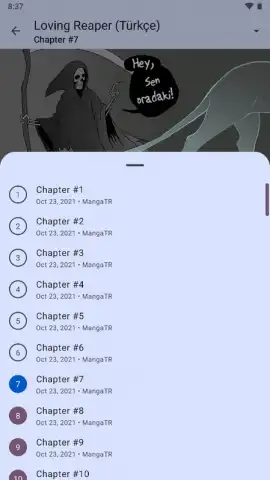
The offline reading capability is implemented with notable efficiency. From any manga title or chapter view, a tap on the menu icon reveals a download option. Users can elect to download a single chapter or queue an entire series for archival. The app manages the download process in the background, fetching and storing the images locally. It is crucial to monitor storage space when downloading extensive series, as high-quality image collections can consume several gigabytes. For regular use, the Turbo feature, which likely refers to a premium unlock, is mentioned as removing any residual limitations and enhancing performance, contributing to an ad-free and uninterrupted experience.
Key Feature Breakdown
- Aggregated Multi-Source Catalog: Accesses over 100 independent online manga libraries through a single search interface, ensuring maximum availability and redundancy for finding both popular and obscure titles.
- Advanced Offline Mode: Downloads entire series or individual chapters for permanent local storage, enabling reading without any internet connection and full user control over their personal archive.
- Customizable Reading Engine: Provides extensive viewer settings including orientation lock, multiple zoom modes, adjustable color filters, and configurable touch/button controls for a tailored reading experience.
Final Analysis and Value Proposition
Kotatsu distinguishes itself by solving the core problem of manga accessibility on Android. It removes the friction of navigating disparate websites and delivers a polished, user-controlled reading environment. The ability to build a permanent offline library from free, publicly-accessible sources is a significant advantage for commuters, travelers, or anyone with unreliable connectivity. While the app’s efficacy is dependent on the health of its configured external sources, its design as a pure client means your downloaded content remains accessible regardless. For readers seeking a centralized, powerful, and respectful manga management tool—one that prioritizes user choice over locked-in content—Kotatsu presents a compelling solution.
Download the Kotatsu app now—exclusive, ad-free access to this unified manga platform is a limited-time offer for new users. Transform your device today before this opportunity closes.
Internet required for initial access. IAP available.


