

Status Saver
Status Saver screenshots (4)


Description Status Saver
The Problem with Fleeting Moments
WhatsApp Statuses offer a brief, 24-hour window into the lives of your contacts, presenting a common frustration: you see a compelling photo or an unforgettable video update, but have no native, straightforward method within WhatsApp itself to preserve it for later viewing or sharing. This creates a gap between ephemeral digital content and the user's desire for control, often leading to missed opportunities to save memorable media shared by friends and family.
A Focused Utility for Direct Media Recovery
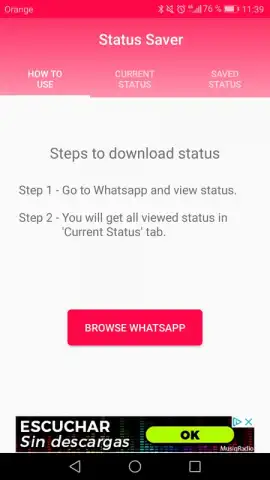
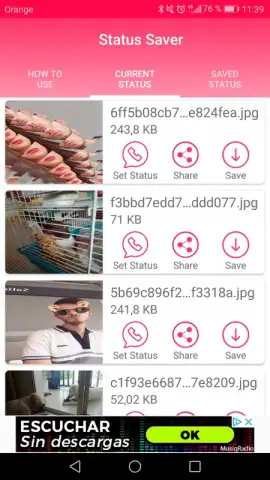
Status Saver operates with a singular, efficient purpose: to bridge that gap by functioning as an auxiliary tool for media recovery. The application establishes a direct link with the WhatsApp storage directory on your device, scanning for and displaying any Status updates viewed within the WhatsApp application. It does not interact with WhatsApp's servers or require your login credentials; instead, it accesses the local cache where these files are temporarily stored after viewing. The interface is deliberately minimal, divided into three primary tabs that logically guide the user from discovery to archiving. The first tab provides clear operational instructions, the second serves as the intake area where newly viewed Statuses automatically populate, and the third acts as a permanent library for all your saved items.
Core Functionality and User Workflow
The process is intentionally streamlined. Once you view a contact's Status in WhatsApp, you simply switch to the Status Saver application. The media will appear in the dedicated intake tab, now available for local processing. From here, you are presented with a set of concrete file-management actions.
- Save to Device Gallery: Permanently export photos and videos to your phone's standard camera roll or a designated folder, converting temporary cache files into owned media files.
- Share via Other Platforms: Instantly redistribute saved Statuses through any other installed application, such as email, cloud storage, or alternative social media and messaging apps.
- Repost to Your Own Status: Re-upload any saved content directly back to WhatsApp to set as your own Status update, facilitating easy content recycling and sharing.
The library tab provides a visual grid of all previously saved content with clear thumbnails. Tapping any item opens it in a full-screen viewer for verification before any action, ensuring the file is intact. Management options here include the ability to delete items from the saver's library to free up space, maintaining organizational control over your collected media. The design prioritizes discoverability and speed over decorative elements, making the path from viewing a Status to securing it a matter of a few taps.
Analytical Perspective on the Market
Within the niche of WhatsApp utility tools, Status Saver adopts a lean, focused approach. While the core technical function—accessing the local WhatsApp cache—is similar to other utilities like WhatsApp Status Downloader, the differentiation lies in its presentation and user experience. The developer has opted for a cleaner, more intuitive layout that reduces cognitive load. Buttons are clearly labeled, the tab system is immediately understandable, and the automatic sorting of new content reduces manual searching. This emphasis on a frictionless interface is its primary competitive advantage, turning a technical process into a simple, reliable habit for the user.
Download this utility application immediately to take permanent control of transient content!
Internet required. IAP available.


