

Android Booster FREE
Android Booster FREE screenshots (4)
Description Android Booster FREE
Is your Android device feeling sluggish, with battery life that seems to vanish too quickly? Android Booster FREE by NQ Mobile Security presents itself as a comprehensive toolkit designed to address these common performance and maintenance issues through a combination of automated optimization and granular manual control.
Core Functionality and Performance Tools
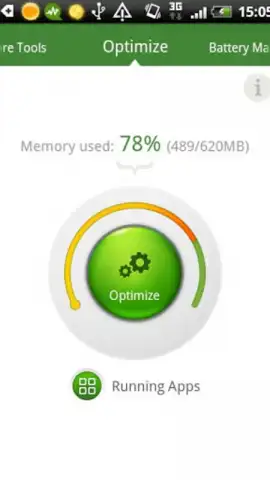
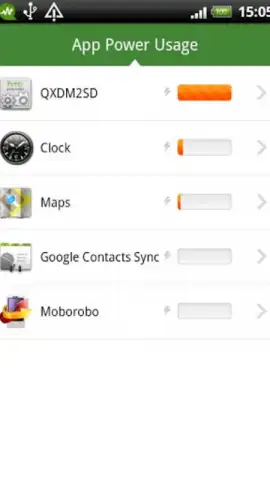
The application operates on a dual-axis approach to system management. Its primary function is a one-tap optimization engine that performs a series of background tasks aimed at freeing up RAM, halting unnecessary background processes, and clearing temporary cache data. This provides an immediate, albeit sometimes temporary, performance uplift. For users who prefer detailed oversight, the app provides a complete list of currently running applications, displaying their individual memory and CPU consumption. This allows for the manual termination of resource-hungry apps that may not be essential, offering a more targeted approach to managing device resources.
Extended Utility Suite for System Management
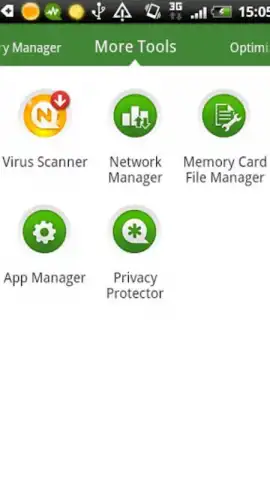
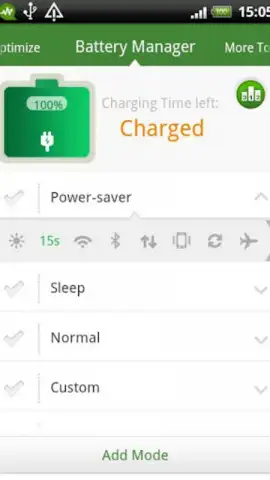
Beyond the core booster, the software integrates several dedicated management modules. The battery utility is particularly notable, featuring four distinct power-saving modes. These range from a balanced everyday setting to aggressive profiles that severely limit background activity and connectivity to eke out maximum standby time. The network monitor acts as a traffic firewall of sorts, providing a real-time overview of which applications are actively using your mobile data or Wi-Fi connection, enabling you to curtail unexpected data usage. The package is rounded out with additional utilities, including a basic antivirus scanner for on-demand checks and an integrated file manager for local storage navigation and cleanup.
Detailed Feature Analysis
- One-Tap Turbo Boost: Initiates an automated sweep to clear junk files and stop background processes for instant responsiveness.
- Manual App Task Manager: Displays a detailed list of running apps with resource usage stats for selective closure.
- Multi-Mode Battery Saver: Offers four configurable power profiles to significantly extend battery life per charge.
- Real-Time Network Monitor: Identifies and lists all applications currently accessing the internet over mobile data or Wi-Fi.
- Integrated Security and File Tools: Includes an on-demand antivirus scanner and a basic file manager for system maintenance.
This suite of tools consolidates several essential maintenance functions into a single interface. While the one-tap boost offers convenience, the true value for power users lies in the detailed monitors and configurable modes that provide transparency and control over the device's operation.
Limited offer: Exclusive access for first users! Download Android Booster FREE today to unlock immediate performance gains and take control of your device's battery and data usage. Click to install now.
Disclaimer: This application requires an active internet connection for certain features, including antivirus updates. The app is free to download and use, with optional in-app purchases available.


